You already know which children are struggling. Proving it shouldn’t take your week.
Phoenix Ember puts every wellbeing score, every intervention and every piece of evidence for every pupil in one place. The picture you carry in your head becomes the picture the school acts on.
The decline is gradual. The referral isn’t.
A child slips half a point in one domain in the autumn term. By spring it’s a point and a half. Nobody did anything wrong. The scores were in an exercise book, a spreadsheet and two people’s heads, and no one was looking at all three at once.
By summer it’s a safeguarding referral, and the question in the meeting is the one every SENCO dreads: when did this start?
We pulled this list from the SENCOs we spoke to before designing the product. Every point came up more than once.
- Everything lives in different placesExercise books, spreadsheets, CPOMS, handwritten notes. You know a child is struggling, but pulling together the full picture takes an hour you don’t have.
- You only find out when it’s already a crisisWithout the scores in one place, patterns get missed. A gradual decline across two terms goes unnoticed until it becomes a referral.
- Nobody can see across the schoolThe pattern in one class is invisible from the next. Nobody has the pattern across a trust at all.
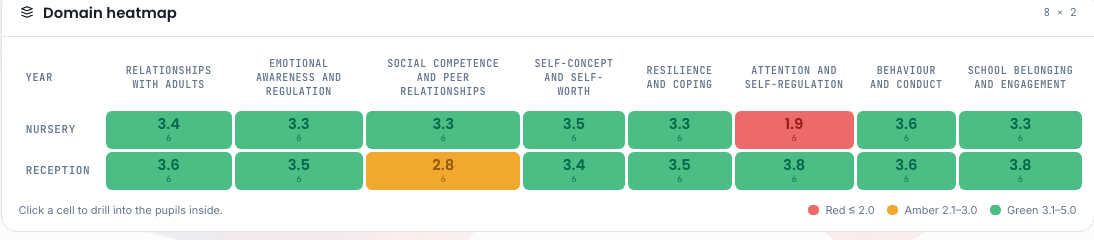
One red cell. In a spreadsheet nobody sees it. In Phoenix Ember it is on the first screen a SENCO opens in the morning.
The admin is where the week goes.
None of this is the job. It’s the tax on the job, and it’s paid by the person with the least time to spare.
The Tuesday morning
One child’s full picture pulled together from five places before a meeting at ten. Every week. For every child in the meeting.
The ISP afternoon
An Individual Support Plan written from scratch again, because last term’s is a Word document somewhere and the evidence is somewhere else.
The EHCP evidence pack
Assessment history, interventions, outcomes and a narrative, assembled by hand for an application that will ask for all of it again at review.
The trust spreadsheet
Every school sends a different one. Benchmarking them is a job nobody has, so nobody does it.
Everything, on day one. Here it is.
Every screen below is the actual product with demonstration data. It’s built, and none of it costs extra.

Score a whole year group in one sitting.
Eight wellbeing domains, forty indicators, two hundred anchor descriptions in plain English, so two colleagues rate the same pupil the same way. Add your own domains and indicators alongside the Phoenix eight.
- ✓Scoring adjusts for the pupil’s age, and you can see and change every adjustment
- ✓Decide how often pupils are reassessed, and reassess any pupil at any time
- ✓Every score keeps the one before it, so the change is on the page, not just the number

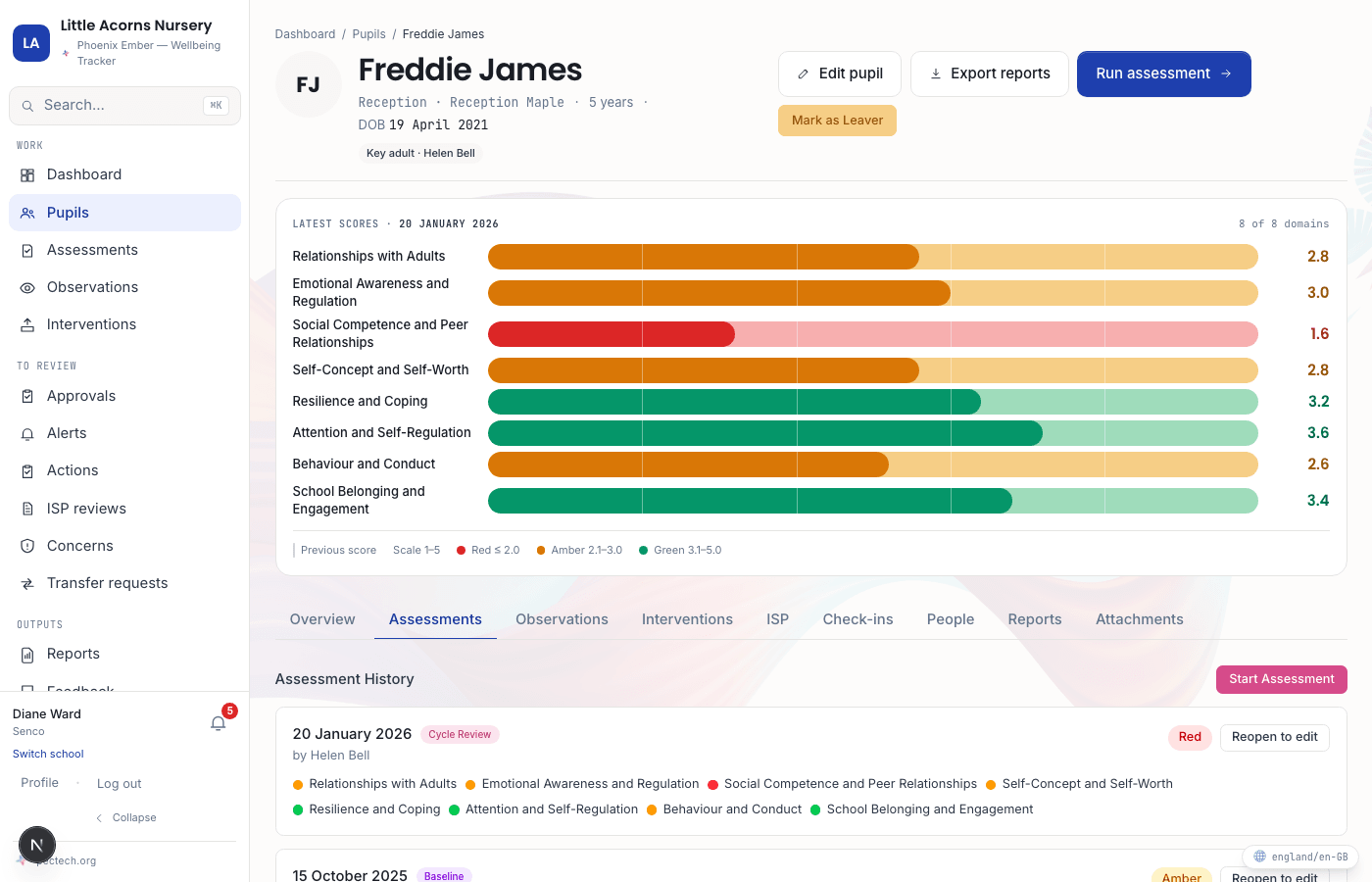
Every child, one page.
Domain bars, this assessment against the last, observations, interventions, targets and the child’s own words, in the order a SENCO reads them.
- ✓Possible reasons behind a low score, suggested for the domains that need it
- ✓A target against any domain, graded met, moving or stalled, with an alert when it stalls
- ✓Attachments and documents on the pupil’s profile, and everything comes with you if you ever leave

Choose from evidence. Then measure it.
A library organised by depth: surface, small-group and specialist. Each programme carries its evidence base, who can deliver it and what to watch for. Log every session. Phoenix Ember shows the before and after against the last assessment.
- ✓Every evidence statement checked against its source
- ✓Build your own bank alongside the library, mapped to any domain, Phoenix or yours
- ✓Effectiveness per domain and per programme, on the intervention’s own page and on the trust dashboard
When a score drops, someone is told.
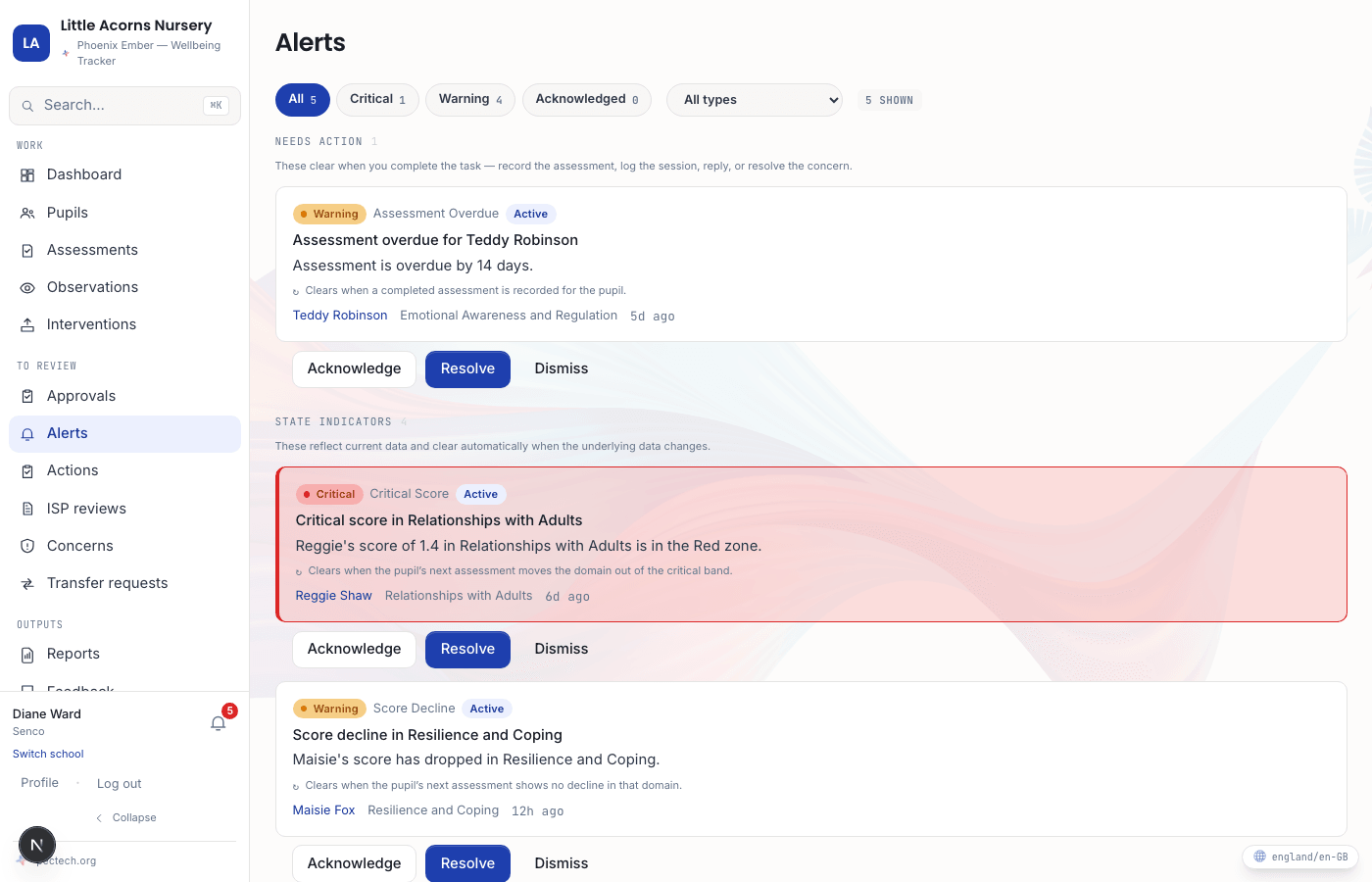
A drop of half a point or more between assessments raises a warning. Any domain in the red raises a critical alert. Overdue assessments send a reminder to the key adult. Any member of staff can raise a concern and it routes to the SENCO or a senior leader, with every response logged.
- ✓Nine concern categories, from attendance to sensory regulation
- ✓Acknowledge, resolve or dismiss. Nothing goes quiet on its own
- ✓A worry becomes a concern and then an action without anything being re-typed
Phoenix Ember isn’t your safeguarding system. Keep CPOMS or MyConcern. This is where the early signal lives.

The ISP, the EHCP pack and five more, from what’s already there.
Individual Support Plan, EHCP evidence pack, pupil profile, SENCO handover pack, school summary, cohort report and trust summary, as PDFs with your logo on every page. Groups of fewer than five pupils are never shown.
- ✓The ISP is a living document: your narrative, the evidence pulled in for you, a review date, and a dated copy that can’t be changed once it’s closed
- ✓Every table sorts and exports what you’re looking at as a spreadsheet
- ✓Subject Access Requests are tracked against their deadline
Every school. One dashboard.
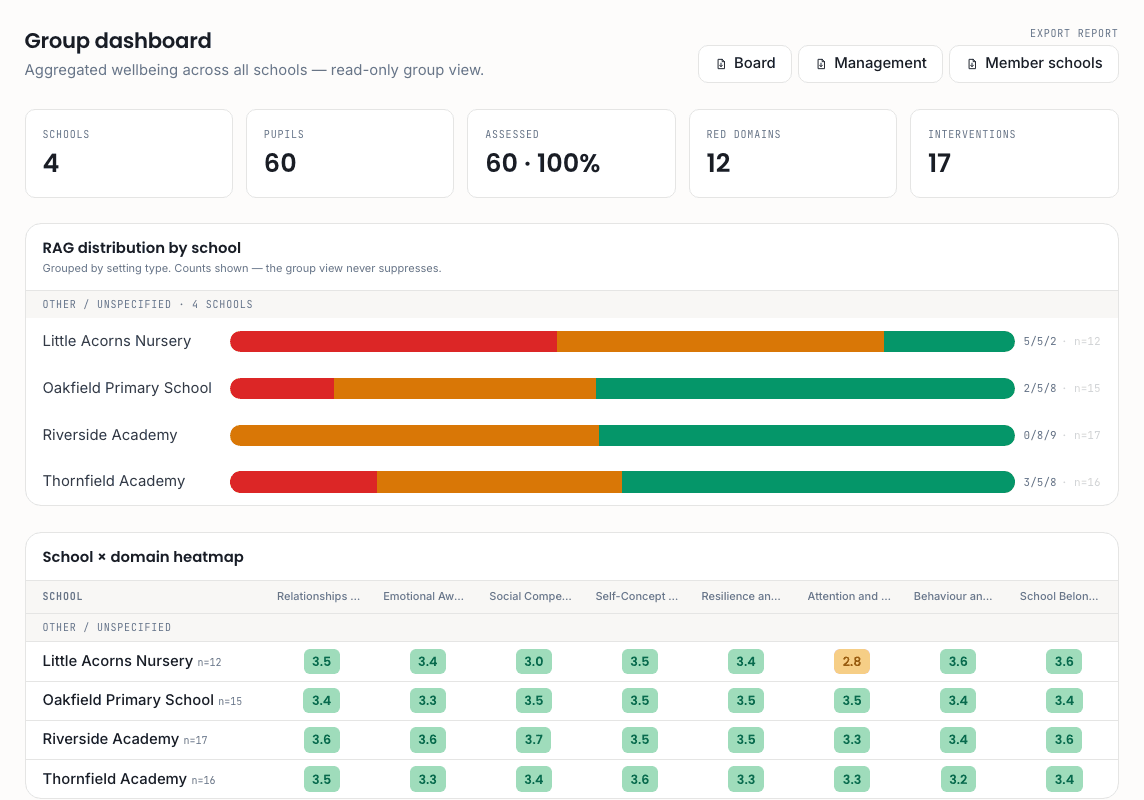
The whole group at a glance, and any one school when you need it. RAG distribution per school, a domain heatmap across the group, and a trust summary PDF for the board.
- ✓Cross-school pupil transfer: the receiving school approves, and history and support plans travel with the child
- ✓Benchmark school against school, and wellbeing against academic progress
- ✓One price per school. No per-person fees
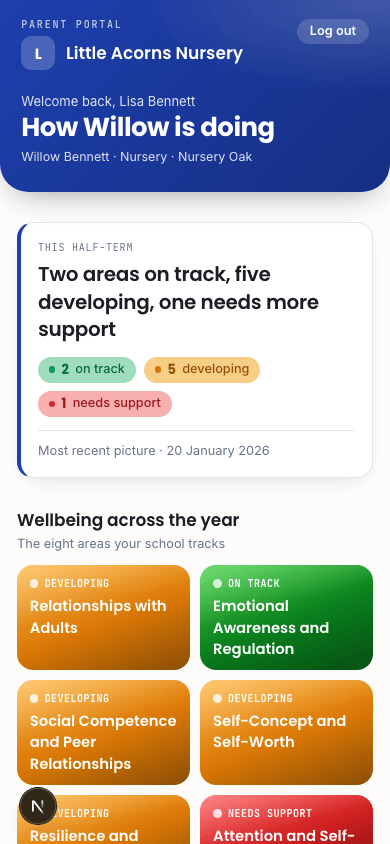
Plain English for parents. Never the raw scores.
Parents see “On track”, “Developing” or “Needs support”, the interventions that are running, and the strategies to try at home. Parents have their own sign-in, can’t change anything, and never see the staff side.
- ✓ISP documents to download
- ✓A note back to the school that doesn’t carry the parent’s name
- ✓Parents manage their own email and password without going through the office
The same Tuesday, with Phoenix Ember.
There’s nothing here to learn. It’s the order a SENCO already works in, with the looking-up taken out.
- 1
Open the dashboard.
The alerts are already there: one critical, two score drops since the last cycle, and the assessments that are overdue.
- 2
Open the pupil’s profile.
Eight bars, this term against last, last Thursday’s observation, the sessions logged so far, and what the child said.
- 3
Line up the next step.
Shortlist the next programme from the library, with its evidence and who can deliver it, ready for the meeting.
- 4
Produce the ISP.
It pulls in the pupil’s history, adds your narrative, and comes out with the school’s logo on it.
- 5
Walk into the meeting at ten.
With the picture you already had in your head, on paper and dated.
Wellbeing stops being the thing you do after the incident.
Phoenix Ember is the tool. This is what changes in what the school offers its pupils.
Wellbeing gets treated like attainment.
It gets scored, tracked and reported with the same seriousness as attainment. It sits on the dashboard beside academic progress.
Support starts before the incident.
The half-point drop in October gets an intervention in October, not a referral in June. Alerts on every drop, targets that say when they have stalled, and a check-in that records the child’s own voice.
Evidence builds up instead of starting again.
Every session logged, every score kept, every plan kept and dated. The next ISP starts from the last one. What Ofsted asks for and what an EHCP panel asks for is already there.
“I’ve spent twenty years in classrooms and a decade advising government on SEND. Phoenix Ember is the tool I wish I’d had every September — every domain, indicator and intervention grounded in what actually works in the classroom.”
Hosted in London on AWS. Pupil data never leaves the UK.
At rest and in transit.
Every important action is recorded, whoever took it.
Any group of fewer than five pupils is left out of every report.
Teachers see their pupils. SENCOs see the school. Parents see only their child.

Six weeks. No card. Every feature.
Import your pupils from a spreadsheet, invite your staff, and run your first assessment cycle. When the six weeks end, nothing is billed unless you choose to continue.
If it doesn’t save you a Tuesday morning, walk away.